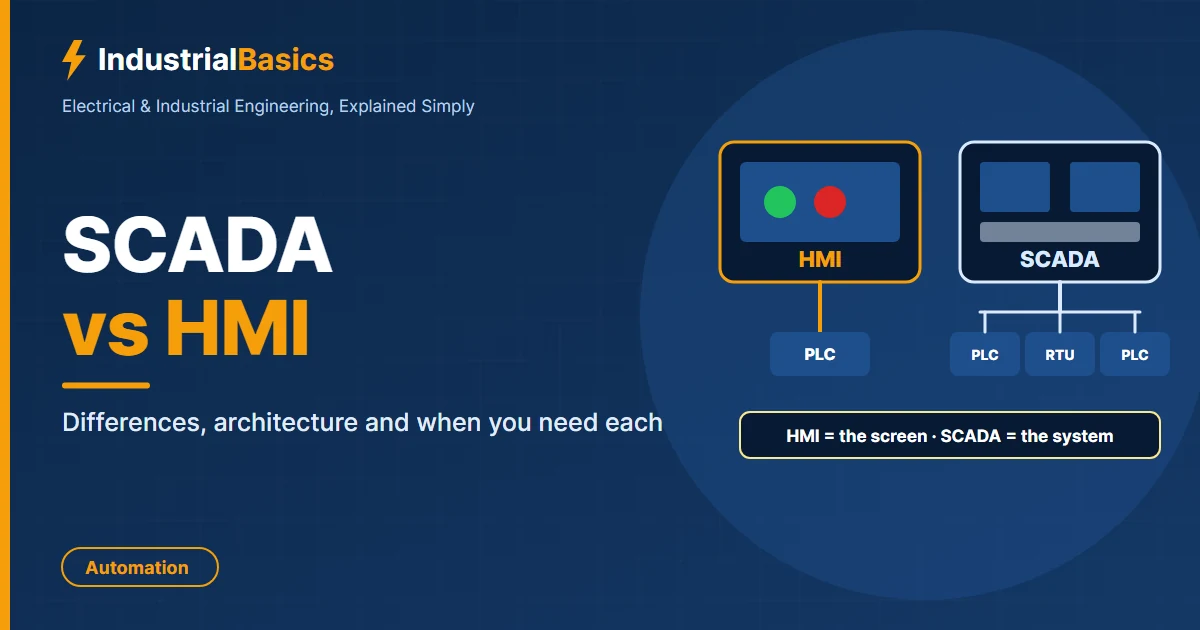
An HMI (human–machine interface) is the operator screen used to see and control a machine or process. SCADA (supervisory control and data acquisition) is the whole system that collects data from many PLCs and RTUs, often across sites, and handles alarms, history and supervisory commands. SCADA includes HMI screens, but an HMI can also stand alone on one machine. In short: every SCADA system has HMIs, but not every HMI is part of a SCADA system.
SCADA vs HMI: Comparison
| HMI | SCADA | |
|---|---|---|
| What it is | The operator interface: screens, graphics, touch or mouse input | An architecture: supervisory computers, communications, HMIs, historian |
| Scope | Typically local to one machine or piece of equipment | Supervises many PLCs/RTUs, often many sites |
| Data | Live values for the operator | Data acquisition, historian, trending, reports |
| Alarms | Displays alarms | Alarm detection, logging, acknowledgement, notifications |
| Communications | Usually one PLC over a local network | Polling of PLCs/RTUs over LAN, radio, cellular or satellite |
| Hardware | Operator panel, panel PC or workstation | Servers, workstations, network, RTUs |
| Controls the process? | Sends operator commands to the PLC | Supervisory setpoints and commands; PLCs/RTUs do real-time control |
What an HMI Does
Wikipedia describes the HMI as the operator window of the supervisory system. It presents plant information graphically as mimic diagrams, alongside alarm and event pages and trend graphs. A pump symbol shows the pump is running and a flow meter symbol shows the flow. Operators can switch the pump off with a click or touch and watch the flow fall in real time. HMI packages include a drawing program so engineers can build and change these screens.
The term also has a narrower hardware meaning. Wikipedia’s user interface article notes that an HMI is typically local to one machine. An operator interface reaches multiple pieces of equipment linked by a host control system. On the plant floor, “HMI” often simply means the touch panel bolted to the machine; see the industrial monitor guide for the hardware side.
What SCADA Adds
- Supervisory computers gather data from field controllers and send commands. In a small system this is one PC with the HMI built in; larger systems use redundant servers with separate HMI clients.
- Communications to PLCs and RTUs, often remote, using protocols such as Modbus, DNP3, IEC 60870-5-101/104 or IEC 61850.
- Alarm handling: detecting alarm conditions, raising indicators, sending email or text messages and recording operator acknowledgement.
- Historian data for trending and analytical auditing.
- Resilience: PLCs and RTUs run autonomously on their last commands, so a communications failure need not stop the plant.
Wikipedia places SCADA at level 2 of the automation hierarchy. Level 0 is field devices, level 1 PLCs and RTUs, level 2 the supervisory computers and operator screens, and level 3 production control, which monitors production and targets without controlling the process. For how PLCs, DCS and SCADA divide the work, see PLC vs DCS vs SCADA and what is a PLC.
HMI or SCADA: Quick Needs Check
Why the Line Is Blurry: “HMI/SCADA” Software
Since about 1998, virtually all major PLC manufacturers have offered integrated HMI/SCADA systems, many using open, non-proprietary protocols. Third-party HMI/SCADA packages with drivers for most PLCs also let engineers build screens without custom programming (Wikipedia). The same software family can run a single machine panel or a plant-wide system with servers and dozens of clients, which is why searches for “HMI SCADA software” mix the two. The architecture tells you which one you have, not the product name. Driver choices are covered in HMI communication drivers.
Alarm Management for HMI and SCADA
The most common alarm problem is the alarm flood: too many alarms during a plant upset for operators to act on. Alarm management applies human factors and instrumentation engineering to fix it. The main guides are ANSI/ISA-18.2 (Management of Alarm Systems for the Process Industries), EEMUA 191, API 1167 for pipelines and NAMUR NA 102 (Wikipedia, Alarm management).
Frequently Asked Questions
What is the difference between SCADA and HMI?
An HMI is the operator screen: the graphical window used to see and control a machine or process. SCADA is the whole supervisory system: the computers, communications and software that gather data from many PLCs and RTUs, handle alarms and history, and include HMI screens for the operators.
Is HMI part of SCADA?
Yes. Wikipedia describes the HMI as the operator window of the supervisory system: it shows mimic diagrams, alarms and trends driven by live data from the SCADA computer. But an HMI can also stand alone on a single machine without any SCADA.
What does HMI stand for?
Human–machine interface. In industry it usually means the operator panel or screen software; it evolved from the older term MMI (man–machine interface).
What does SCADA stand for?
Supervisory control and data acquisition: a control system architecture of computers, networked communications and graphical interfaces for high-level supervision of machines and processes.
Can an HMI replace SCADA?
For one machine or a small cell, often yes. Once you need many controllers, remote sites, multiple operator stations, long-term history or alarm notifications, you are describing SCADA, even if the software is sold as an HMI package.
Does SCADA control the process directly?
Not in real time. PLCs and RTUs run the control logic autonomously; SCADA supervises and sends setpoints and commands. If SCADA communications fail, the controllers keep running on their last commands (Wikipedia).
What is a mimic diagram?
A schematic of the plant on the HMI screen, with live symbols: a pump that shows running or stopped, a flow meter showing the current rate. Operators can click a symbol to issue commands.
What is a historian?
A database that stores process values over time for trending, reports and analysis. In SCADA systems it is fed by the supervisory computers, often built on a commodity database (Wikipedia).
What protocols does SCADA use?
Common ones include Modbus, DNP3, IEC 60870-5-101/104 and IEC 61850, plus vendor protocols such as Profibus. Many legacy SCADA protocols poll RTUs and lack built-in encryption.
Which alarm standards apply to HMI and SCADA?
ANSI/ISA-18.2 (management of alarm systems in the process industries) and EEMUA 191 are the main guides; API 1167 covers pipelines and NAMUR NA 102 is used in Europe. They target problems such as alarm floods.
Sources and Further Reading
- Wikipedia: SCADA: architecture levels, components, HMI, alarm handling, protocols, security.
- Wikipedia: User interface: HMI vs operator interface, MMI.
- Wikipedia: Alarm management: alarm floods, ISA 18.2, EEMUA 191, API 1167, NAMUR NA 102.