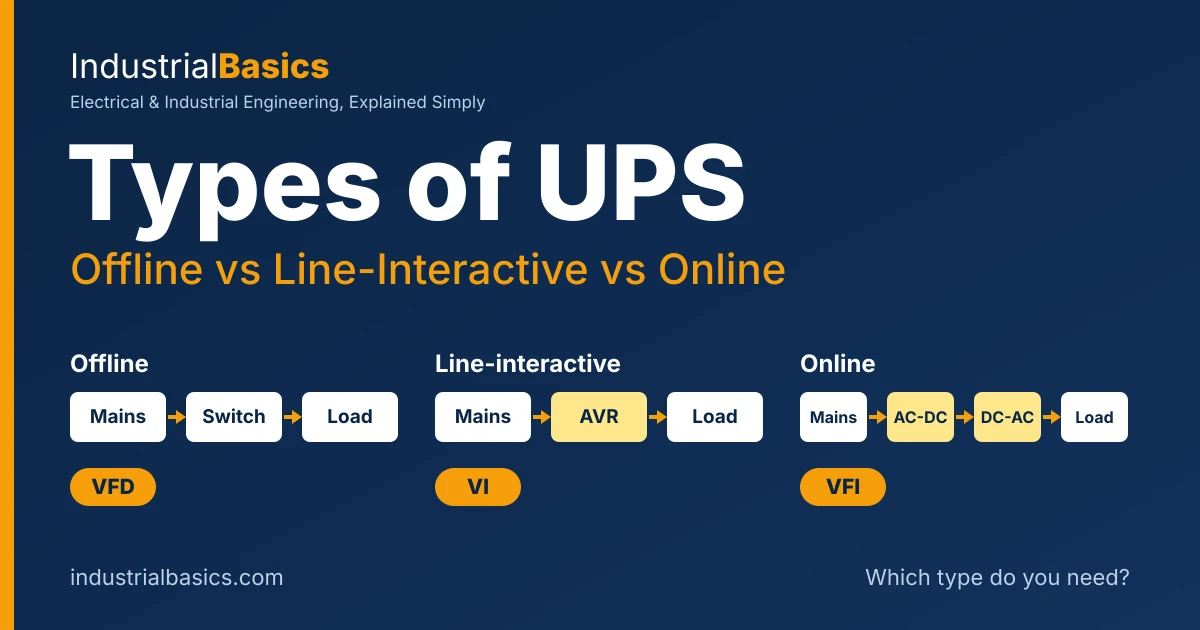
There are three main types of UPS: offline (also called standby), line-interactive and online (also called double-conversion). An offline UPS passes mains power straight to your equipment and switches to its battery when the supply fails. A line-interactive UPS adds automatic voltage regulation (AVR), so it can correct low or high voltage without using the battery. An online UPS converts incoming power to DC and back to AC all the time, so your equipment never connects directly to the mains.
The international standard IEC 62040-3, published in the UK as BS EN IEC 62040-3, classifies these designs as VFD, VI and VFI. In the UK the legal supply is 230 V, with a permitted range of 216.2 V to 253 V, so every UPS has to cope with some natural variation even before a power cut happens. This guide explains how each type works, how they differ, which waveform to look for, and how to choose and size one for a home, office, server room or industrial control panel.
| UPS type | IEC class (usually) | Protects against | Best for | Main drawback |
|---|---|---|---|---|
| Offline / standby | VFD | Power cuts and basic surges | Home PCs, routers, tills | No voltage regulation; short transfer gap |
| Line-interactive | VI | Power cuts plus sustained low or high voltage | Home offices, small offices, network cabinets | No frequency regulation; waveform varies by model |
| Online double-conversion | VFI | Power cuts, voltage and frequency changes, most mains noise | Servers, data centres, PLC panels, sensitive equipment | Highest cost, more heat and fan noise |
What Is a UPS and How Does It Work?
What is an uninterruptible power supply?
An uninterruptible power supply (UPS) keeps equipment running for a short time when the mains supply fails or drifts outside safe limits. It stores energy in a battery and uses an inverter to turn that DC energy back into AC. Some designs also clean up the incoming supply before it reaches your equipment.
A UPS is not a generator. It gives you minutes, or longer with large battery banks, to save work, shut down safely or let a standby generator start. A generator can run for as long as it has fuel, but it cannot react instantly to a power cut. On critical sites the two work together.
Main components of a UPS
| Component | What it does |
|---|---|
| Rectifier / charger | Converts AC to DC and keeps the battery charged |
| Battery | Stores the energy; usually sealed lead-acid (VRLA) or lithium-ion |
| Inverter | Converts battery DC back into AC for the load |
| Static transfer switch | Moves the load between the mains path and the inverter path |
| Automatic voltage regulator (AVR) | Boosts low voltage or reduces high voltage in line-interactive designs |
| Bypass circuit | Gives the load a direct mains path during overload, a fault or maintenance |
How does a UPS work during a power failure?
- Normal supply. Mains feeds the load (directly, through an AVR, or through a rectifier and inverter, depending on the type) and the charger keeps the battery full.
- Monitoring. The UPS checks the input voltage and frequency all the time.
- Failure detected. If the supply fails or leaves the acceptable range, the inverter takes over using battery energy.
- Battery operation. The UPS sounds an alarm and equipment keeps running until you shut it down or the battery runs low. Many models can send an automatic shutdown signal over USB or the network.
- Return to normal. When the mains is back and stable, the UPS transfers the load back and recharges the battery.
Most UK power cuts are short. The Energy Networks Association reported that the average power cut lasted 33 minutes in 2019/20, down from 39 minutes in 2015. UK Power Networks says an average customer on its network is off supply for under half an hour a year. That is exactly the gap a UPS is built to cover. Network reliability figures generally count only interruptions of three minutes or longer, so they hide the dips and flickers that still reboot computers and trip controllers.
The first number matters because the supply to your socket is allowed to vary by a surprising amount. UK Power Networks confirms the permitted band is 216.2 V to 253 V.
What Are the Main Types of UPS?
Most UPS products use one of three topologies. The easiest way to tell them apart is to follow the power. The table shows the path in normal mode and in battery mode. The IEC class mappings are common conventions, so always check the class and performance declared on the datasheet.
| UPS type | Normal mode power path | Battery mode power path |
|---|---|---|
| Offline / standby | Mains → filter → transfer switch → load | Battery → inverter → transfer switch → load |
| Line-interactive | Mains → filter → AVR → transfer switch → load | Battery → inverter → transfer switch → load (the inverter also charges the battery) |
| Online double-conversion | Mains → rectifier → DC bus → inverter → load | Battery → DC bus → inverter → load, with no switching |
Offline UPS (Standby UPS)
An offline UPS is the simplest and cheapest type. In normal operation the load runs from the mains through a surge-suppression and filter stage, while a small charger keeps the battery topped up. The inverter stays idle.
How does an offline UPS work?
When the UPS senses a power cut or a voltage that is too low, a transfer switch disconnects the mains path and the inverter starts feeding the load from the battery. There is a short gap while this happens. Eaton and Schneider Electric both quote about 10 ms or less for standby designs, and many computer power supplies can ride through a break that short. The exact figure depends on the model.
Because the load connects straight to the mains, an offline UPS does not regulate voltage or frequency in normal mode. On battery, many low-cost units produce a simulated (stepped) sine wave.
Advantages and disadvantages of an offline UPS
| Advantages | Disadvantages |
|---|---|
| Lowest purchase cost | No voltage regulation in normal mode |
| Simple, compact and efficient, as the inverter is idle | Short gap while it transfers to battery |
| Enough for basic backup and safe shutdown | Often a simulated sine wave on battery |
| Easy to find for home use | Moves to battery more often on poor mains, which wears the battery |
Applications and when to use an offline UPS
Use an offline UPS for equipment that tolerates a brief break and runs on fairly stable mains. Typical examples are home PCs, broadband routers, point-of-sale tills and non-critical peripherals. Avoid it where the supply is unstable or the load is sensitive.
Line-Interactive UPS
A line-interactive UPS works like an offline UPS with one important addition: an AVR between the mains and the load. The inverter stays connected to the output and can run in reverse to charge the battery. Eaton describes it as the most widely used topology for loads under 10 kVA.
What is AVR and how does it regulate voltage?
Automatic voltage regulation (AVR) corrects the voltage without touching the battery. It is commonly built around a tapped transformer. When the supply is low, a relay selects a tap that boosts it. When the supply is high, another tap reduces it. Designs differ and the correctable range depends on the model. For example, if the supply sags to 205 V and the AVR range covers it, the output can be lifted back towards 230 V while the UPS stays on mains power.
The UPS goes to battery only when the input fails, moves outside the AVR range, or the input frequency is unacceptable.
How does a line-interactive UPS work?
In normal mode, power flows from the mains through the filter and AVR to the load. In battery mode, the transfer switch isolates the mains and the inverter powers the load from the battery. Manufacturers quote about 10 ms or less for the switch, but models differ. The frequency is not regulated, so the output follows the mains frequency.
Advantages and disadvantages of a line-interactive UPS
| Advantages | Disadvantages |
|---|---|
| Corrects sags and swells without using the battery | Does not regulate frequency or remove waveform distortion |
| Less battery wear than a standby unit on weak mains | AVR range is limited and varies by model |
| Good protection for a moderate price | Still needs a transfer when the mains fails |
| Many models offer pure sine wave output | Output voltage still follows the input to some degree |
Applications and when to use a line-interactive UPS
Choose line-interactive when sags and swells are common, the equipment is IT-grade but not mission-critical, and budget matters. It suits small servers, network switches, storage, home offices, small businesses and PCs. Check whether the model gives a pure sine wave on battery.
Online UPS (Double-Conversion UPS)
An online UPS puts the load behind a rectifier and an inverter all the time. Incoming AC becomes DC, which also charges the battery, and the inverter creates a fresh AC output from that DC. In normal operation the load never connects directly to the mains.
What is double conversion in a UPS?
Double conversion means two conversions: AC to DC in the rectifier, then DC back to AC in the inverter. Because the output is rebuilt from the DC bus, it does not depend on the input voltage or frequency, and the battery sits on that same DC bus.
How does an online UPS work during a power failure?
Nothing needs to switch. The battery takes over supplying the DC bus and the inverter carries on feeding the load. That is why Schneider Electric and Eaton describe zero transfer time in normal double-conversion mode.
What is the static bypass switch?
A static bypass is an electronic switch that gives the load a direct mains path if the inverter is overloaded, an internal fault occurs, or the UPS needs maintenance. While on bypass the load is exposed to mains disturbances, so bypass events should be rare.
What is Eco Mode in an online UPS?
Eco mode, also called high-efficiency mode, runs the load through the bypass path while the mains is clean, then switches back to double conversion if it detects a problem. It saves energy but reduces protection. Section 7 explains the trade-off.
Advantages and disadvantages of an online UPS
| Advantages | Disadvantages |
|---|---|
| Continuous conditioning of the output | Highest purchase cost |
| No transfer on a power cut in normal mode | Higher conversion losses, so more heat |
| Regulates voltage and frequency | Fan noise is more noticeable |
| Tolerates a wide range of input voltage and frequency | More complex, with more parts to maintain |
Applications and when to use an online UPS
Use an online UPS when downtime is costly or the equipment is sensitive. Typical uses are servers, data centres, medical and laboratory equipment (with the right specification), PLC power supplies and sites with poor mains or generator supply. It is the usual choice at the top end of the market: one report puts double-conversion at about 44.65% of the data-centre UPS market in 2025.
Other Types of UPS Systems
These designs are less common and are mostly found in larger or specialised installations.
Delta-conversion UPS
Delta-conversion is a variation on the online design. A delta converter adds or removes only the difference between input and output voltage, so most of the power passes through without a full double conversion. That cuts losses compared with a conventional double-conversion UPS. It is mainly associated with Schneider Electric (APC) products at larger sizes, and its IEC class depends on the model, so check the datasheet.
Rotary UPS
A rotary UPS uses a motor-generator set. The mains drives a motor connected to a generator that supplies the load, so a spinning machine isolates the load from the mains. A flywheel, batteries or a diesel engine provide ride-through. Rotary UPS suit heavy industrial sites and large facilities where high power and ruggedness matter. They fall outside IEC 62040-3, which points to separate standards for rotary UPS.
Flywheel UPS
A flywheel UPS stores kinetic energy in a spinning rotor instead of chemical batteries. When the mains fails, the rotor’s momentum drives a generator for a short time, usually seconds, which is enough to start a standby generator. Advantages include a long service life and no lead-acid batteries. Limitations include very short runtime, higher cost and moving parts that need maintenance. It is common in data centres and process sites that already have generators.
Ferroresonant UPS (Standby-Ferro)
A ferroresonant UPS uses a saturating transformer to regulate and isolate the output. It was popular for rugged industrial loads, but it is heavy, runs hot and can behave badly with some generators and modern power supplies. Line-interactive and online designs have largely replaced it.
UPS Classification According to IEC 62040-3
What is IEC 62040-3?
IEC 62040-3 is the international standard that sets out how UPS performance is specified and tested. Names such as “online” and “offline” are marketing labels and can mean different things in different catalogues. The IEC classification lets you compare products by how they behave. Its code has three steps.
| Step | What it describes | Codes |
|---|---|---|
| 1 | How the output depends on the input | VFD, VI or VFI |
| 2 | Output waveform in normal mode and in battery mode | S = sinusoidal, X or Y = distorted; for example SS or SY |
| 3 | Dynamic output performance during sudden load changes | 1 (best), 2 or 3 |
VFD (Voltage and Frequency Dependent)
A VFD UPS keeps the load powered through a complete loss of AC input. In normal mode its output simply follows the input voltage and frequency, with no voltage correction. Some units add basic surge filtering. VFD usually corresponds to an offline (standby) UPS.
VI (Voltage Independent)
A VI UPS meets the VFD requirements and also protects the load from continuous under-voltage and over-voltage, using passive or active circuits (an AVR) to hold the output within declared limits. The frequency still follows the input. This is the class usually given to line-interactive UPS, as defined in the US Department of Energy’s UPS test procedure.
VFI (Voltage and Frequency Independent)
A VFI UPS has an output that does not depend on input voltage or frequency variations, and it achieves this without discharging the battery. Continuous double conversion does this. Some online UPS list more than one class: VFI in double-conversion mode and a lower class in eco mode.
Difference between VFD, VI and VFI UPS
| Feature | VFD | VI | VFI |
|---|---|---|---|
| Output depends on input voltage | Yes | No, within limits | No |
| Output depends on input frequency | Yes | Yes | No |
| Complete power failure | Protected | Protected | Protected |
| Sustained low or high voltage | Not corrected | Corrected by AVR | Corrected |
| Frequency variation | Not corrected | Not corrected | Corrected |
| Waveform distortion and noise | Basic filtering at most | Limited | Largely removed |
| Common topology | Offline / standby | Line-interactive | Online double-conversion |
| Typical application | Home PCs, routers | Offices, network cabinets | Servers, data centres, critical control |
Online vs Offline vs Line-Interactive UPS: Key Differences
This is the comparison most readers come for. Each point below is short, and the table at the end puts everything side by side.
Working principle differences
An offline UPS waits and switches. A line-interactive UPS regulates the voltage, then switches if it has to. An online UPS runs every watt through a rectifier and inverter all the time.
Power protection differences
Offline covers power cuts, plus basic surge filtering on some units. Line-interactive adds sustained sags and swells. Online adds frequency variation and most noise, within its rating.
Voltage regulation differences
Offline has little or none. Line-interactive corrects in steps using AVR taps, within a set range. Online regulates the output continuously.
Frequency regulation differences
Only online regulates frequency. The other two follow the mains. UK mains is nominally 50 Hz, and frequency drift mostly matters on generator supplies.
Battery operation differences
Offline and line-interactive units use the battery after a transfer, and the AVR widens the range before a line-interactive unit needs it. In an online UPS the battery sits on the DC bus and supplies power only when the input fails or falls outside the rectifier’s range.
Transfer time differences
Offline and line-interactive units have a transfer, usually quoted at about 10 ms or less. An online UPS has none on mains failure in normal mode. Section 7 covers this in more detail.
Efficiency differences
Offline and line-interactive units pass most energy straight through, so losses are low. Online units process all power twice, so losses are higher unless eco mode is used.
Cost differences
Offline costs least, line-interactive sits in the middle and online costs most. One data-centre market summary puts the double-conversion premium at roughly 35% over line-interactive. Your own price gap will depend on the size and brand.
Application differences
Offline suits basic home equipment. Line-interactive suits offices and network cabinets. Online suits critical and sensitive loads.
| Feature | Offline UPS | Line-interactive UPS | Online UPS |
|---|---|---|---|
| Common IEC class | VFD | VI | VFI |
| Power path | Mains direct, filtered | Mains through AVR | AC → DC → AC |
| Voltage regulation | Limited or none | AVR in steps | Continuous |
| Frequency regulation | No | Generally no | Yes |
| Battery operation | After transfer | After transfer | Supports the DC bus |
| Transfer behaviour | Transfer needed | Transfer needed | None in normal double-conversion mode |
| Output waveform | Often simulated sine on battery | Pure or simulated sine, by model | Usually pure sine; verify |
| Efficiency | High | High | Lower in double-conversion mode |
| Complexity | Low | Medium | High |
| Cost | Low | Medium | High |
| Typical application | Home PCs, routers | Offices, network equipment | Data centres, industrial systems |
UPS Output Waveforms: Pure Sine Wave vs Simulated Sine Wave
Topology and output waveform are two different characteristics. Topology describes how power flows through the UPS. Waveform describes the shape of the AC voltage it supplies. Do not assume a line-interactive UPS is pure sine, or that an offline UPS is always a square wave. Check the datasheet.
What is a pure sine wave UPS?
A pure sine wave UPS produces a smooth curve like good mains power. It works with all types of equipment, including motors, active-PFC power supplies and sensitive instruments.
What is a simulated or stepped sine wave UPS?
A simulated (or stepped) sine wave UPS approximates the curve with flat steps. It costs less and runs simple loads without trouble, but it can cause extra heat, noise or shutdowns with some equipment.
Difference between pure sine wave and simulated sine wave
| Feature | Pure sine wave | Simulated sine wave |
|---|---|---|
| Shape | Smooth curve | Stepped approximation |
| Typical cost | Higher | Lower |
| Equipment compatibility | Wide | Good for simple loads; risky for some |
| Motors and compressors | Run quietly | May run hotter or noisier |
| Typical use | Servers, workstations, sensitive electronics | Basic home electronics |
Which devices need pure sine wave output?
Eaton warns that some modern IT power supplies do not run properly on a simulated sine wave. Choose pure sine for the following.
- Servers, switches and storage with active power factor correction (PFC) power supplies
- Many gaming and high-performance desktop PCs that use active-PFC supplies
- Motors, compressors and other inductive loads
- Laboratory, medical, audio and other sensitive equipment
- Anything whose manual says “pure sine wave” or “active PFC”
Is a line-interactive UPS always pure sine wave?
No. Eaton notes that some line-interactive models give a pure sine wave on battery, while lower-cost models use a simulated sine wave, like a standby unit. Manufacturers such as APC list topology and waveform as separate lines in their specifications.
Does an online UPS always produce a pure sine wave?
Almost always, because the inverter builds the output continuously. But that is a design tendency, not a guarantee. Check the output waveform and distortion figure on the datasheet.
UPS Transfer Time, Efficiency and Battery Performance
What is UPS transfer time?
Transfer time is how long a UPS takes to switch from mains to battery power when the supply fails or leaves its limits. It is measured in milliseconds.
Why does transfer time matter?
Different loads tolerate different gaps. Many PC power supplies store enough energy to ride through a short break. Some controllers, relays and instruments cannot.
Which UPS has the fastest transfer behaviour?
An online UPS, because it does not transfer on a power cut in normal double-conversion mode. Offline and line-interactive units are commonly quoted at about 10 ms or less. Transfer time is not a fixed property of the topology. It depends on how quickly the UPS detects the fault and how fast its switch and inverter react, so always read the datasheet for your model.
UPS efficiency explained
Efficiency is output power divided by input power, and the difference is lost as heat. Offline and line-interactive units are efficient because most of the energy bypasses conversion in normal mode. An online UPS sends every watt through the rectifier and inverter, so one market analysis puts its energy penalty at about 4 to 6%, with eco mode lifting efficiency to around 99% (Mordor Intelligence). Real efficiency depends on load level and mode. Datasheets list it at set load points, and lightly loaded units are usually less efficient.
Why does an online UPS generate more heat?
Every conversion wastes a little energy as heat. For example, a 10 kW load at 95% efficiency draws about 10.5 kW from the mains, so roughly 0.5 kW becomes heat that the room must remove. In a small cabinet that also means louder fans.
How does UPS operation affect battery life?
Eaton explains that standby units switch to battery more often on poor mains, so their batteries may need replacing sooner. Line-interactive units use the AVR to limit battery use. Online units draw on the battery only for extreme voltage or a complete loss of supply. Heat matters too: for VRLA batteries, every 10°C above the recommended 20–25°C can cut service life by about half.
What is UPS eco mode and how does it work?
In eco mode an online UPS feeds the load through the bypass while the mains is clean, which cuts losses. If the mains drifts out of limits, the UPS returns to double conversion. During that switch there is a short transfer, and in eco mode the UPS behaves more like a VFD unit. Use it only where the load can tolerate that, and check the manufacturer’s transfer figure.
Which Type of UPS Should You Choose?
Most buyers choose the simplest option that fits their load. Mordor Intelligence puts standby units at 52.81% of UPS revenue in 2026, driven by home and small-office buyers, and says 47.4% of revenue comes from units under 10 kVA. Market reports differ in scope, though: Market.us puts online double-conversion at 57.30% of the 2024 market. Treat these as indicators, not exact figures.
Best UPS for home use
An offline or line-interactive UPS. Either protects a PC, router and TV set-up from short cuts. If your area has frequent voltage dips, choose line-interactive. A UPS is for low-power electronics, so do not plug in heaters, kettles or other heavy appliances.
Best UPS for desktop computers
A line-interactive UPS with pure sine wave output is the safe pick, especially for PCs with active-PFC power supplies. Offline is fine for a basic office PC on stable mains.
Best UPS for office use
A line-interactive UPS with a suitable AVR range covers PCs, a router and a network switch. Keep laser printers off the UPS because of their high power draw, unless the UPS is sized for them.
Best UPS for gaming PCs
Choose a pure sine line-interactive or online UPS with a watt rating comfortably above the PC’s peak draw. Check watts, not just VA.
Best UPS for servers and network equipment
A line-interactive UPS with pure sine output suits small server cabinets. Move to online if power quality is poor or downtime is expensive. A network management card allows remote monitoring and automatic shutdown.
Best UPS for data centres
Online double-conversion, usually modular and often with lithium-ion batteries, backed by generators.
Best UPS for industrial applications
Online or an industrial-rated UPS, depending on dust, temperature, vibration and harmonics at the site. No single topology suits every installation, so have the choice reviewed as part of the electrical design.
Best UPS for PLC control panels
Eaton lists PLC power supplies among online UPS uses. Many panels instead use a 24 V DC UPS that backs up the PLC’s DC supply directly. The right choice depends on the control system design. Whichever you pick, select its protective devices with proper protection coordination in mind, so that a fault trips the right breaker.
Best UPS for medical and laboratory equipment
Use a UPS specified for the equipment, and follow the equipment maker’s requirements. Patient-connected or life-support equipment needs a UPS designed for medical use and specified by qualified engineers. In NHS settings, see HTM 06-01 on electrical services.
Best UPS for generator-based systems
An online UPS is often preferred because it tolerates wider input voltage and frequency variation and regulates the output. A line-interactive unit may keep dropping to battery on an unstable generator. Ask both the generator and UPS manufacturers to confirm compatibility.
| Application | Typical choice | Key check |
|---|---|---|
| Home PC, router | Offline or line-interactive | Frequent dips? Choose line-interactive |
| Desktop or gaming PC | Line-interactive, pure sine | Active-PFC power supply; watt rating |
| Office IT | Line-interactive | AVR range; laser printers off the UPS |
| Servers and network | Line-interactive or online | Pure sine; management card |
| Data centre | Online, usually modular | Redundancy, bypass, battery type |
| Industrial and PLC panels | Online or DC UPS | Environment; control system design |
| Medical and laboratory | Online, medical-grade where required | Maker’s requirements; qualified design |
| Generator-backed site | Online | Generator compatibility |
How to Choose the Right UPS System
Understand your power requirements
List every device you want to protect, with its power in watts. Include any equipment you plan to add.
Check the quality of your electricity supply
Frequent sags and swells point to AVR or online. An unstable generator points to online. Remember that the legal UK supply band is already wide, at 216.2 V to 253 V.
Consider the sensitivity of connected equipment
Read the equipment manual for the power supply type, tolerance to short breaks and waveform requirements.
Check UPS capacity and power rating
Compare your load against both the watt and VA ratings, and leave headroom. The sizing section shows how.
Consider required backup time
Decide whether you need time for a safe shutdown, or enough to ride out a longer outage. Longer runtimes need external battery packs or a generator.
Check output waveform
Choose pure sine for active-PFC power supplies, motors and sensitive loads.
Compare efficiency and operating costs
Compare efficiency at your actual load, not at full load. Running cost includes energy losses, cooling and battery replacement.
Consider maintenance and battery replacement
Check the cost and life of the batteries, and whether they can be replaced without shutting the UPS down.
Check bypass and monitoring features
Look for a maintenance bypass, USB or network monitoring, and alarms. Any fixed UPS installation should follow BS 7671 for wiring, with correctly rated upstream protection such as the circuit breakers described in our guide. The earthing and neutral arrangement of the UPS must also match the site’s earthing system, so check it before installation.
UPS Sizing: VA, Watts and Backup Runtime
What is VA in a UPS?
VA (volt-amperes) is apparent power: voltage multiplied by current. It describes the current the UPS must carry.
What are watts in a UPS?
Watts measure real power, the energy your equipment actually uses and the battery must supply.
Difference between VA and watts
Watts are never higher than VA. A UPS has both ratings and you must not exceed either. For example, a UPS rated 1000 VA and 600 W cannot run an 800 W load, even though 800 is below 1000.
What is power factor?
Power factor (PF) is watts divided by VA. Many modern IT power supplies have a PF close to 1, while older or cheaper loads may be lower. The UPS’s own rating also uses a PF, which varies by product.
VA = W ÷ PF
How to calculate the required UPS capacity
- List each device and its power in watts. Use a plug-in power meter if you can, as labels show the maximum rather than typical use.
- Add the figures together.
- Add 20–30% headroom, a common rule of thumb.
- Choose a UPS whose watt rating and VA rating both exceed your result.
How to calculate UPS backup time
Actual runtime depends on battery capacity, load, battery condition and UPS efficiency. It is rarely a straight line, because batteries give less at high loads and age over time. Use the manufacturer’s runtime chart for a real answer.
Why should you keep extra capacity?
Headroom covers start-up surges and future additions, and it leaves margin as the battery loses capacity with age.
Practical UPS sizing example
| Item | Power |
|---|---|
| Desktop PC | 180 W |
| 24-inch monitor | 30 W |
| Router | 12 W |
| Total load | 222 W |
| Add 25% headroom (222 × 1.25 = 277.5 W) | Target: 280 W |
To choose the VA rating, divide the target by the UPS’s power factor. At a PF of 0.6, 280 ÷ 0.6 gives about 467 VA, so a 600 VA unit works. At a PF of 0.9, the same load needs about 311 VA.
For runtime, assume a UPS with 216 Wh of battery energy (two 12 V, 9 Ah batteries), 85% inverter efficiency and 80% usable capacity. Then 216 × 0.85 × 0.8 ÷ 222 ≈ 0.66 hours, or about 40 minutes. Treat that as a best-case estimate.
UPS Battery Types and Maintenance
Common types of UPS batteries
Two types dominate. VRLA (valve-regulated lead-acid) batteries are sealed lead-acid cells and are the most common. Lithium-ion batteries cost more up front but are growing in use, especially in larger and higher-density systems.
Difference between VRLA and lithium-ion batteries
| Feature | VRLA lead-acid | Lithium-ion |
|---|---|---|
| Typical life | 3–5 years | 8–10+ years |
| Charge cycles | About 200–500 | About 3,000–5,000 |
| Upfront cost | Lower | Higher |
| Weight and size | Heavier, bulkier | Lighter, more compact |
| Heat sensitivity | Life falls fast above 20–25°C | Wider temperature tolerance |
Factors that affect UPS battery life
- Temperature. Heat is the biggest factor for VRLA batteries.
- Frequency of discharge. Poor mains and frequent transfers wear batteries faster.
- Age. Capacity falls over time, whatever the chemistry.
- Charging and load. Overloading or poor charging shortens life.
- Ventilation. Cool, ventilated spaces help.
When should you replace a UPS battery?
- The runtime has dropped noticeably.
- The UPS reports a failed self-test or a replace-battery warning.
- The battery is past its rated life, typically 3 to 5 years for VRLA.
- The battery case is swollen, leaking or unusually hot.
Basic UPS maintenance practices
Keep the UPS cool and clear of dust. Run the self-test as the manual advises. Do not overload it. Check the monitoring logs and alarms, and plan replacements before the batteries fail rather than after.
Important UPS battery safety precautions
UPS batteries are heavy, store a lot of energy and can cause burns or fires if shorted. Follow the manufacturer’s instructions and let qualified people handle larger systems. Use the right protective equipment, as set out in our guide to electrical safety and PPE, and isolate the UPS safely using a lockout tagout procedure before maintenance. Large battery strings can also deliver very high fault currents, so an arc flash risk assessment matters on bigger systems.
Advantages and Limitations of UPS Systems
Main advantages of using a UPS
- Backup power during outages
- Protection against certain voltage disturbances
- Lower risk of unexpected shutdowns and data loss
- Time for a safe, controlled shutdown
- Better continuity for critical equipment
Limitations of UPS systems
- Limited battery runtime
- Batteries need replacing
- Purchase and maintenance costs
- Conversion losses and heat, mainly in online designs
- Protection depends on design and mode, so a UPS does not replace correctly specified surge protection devices at the installation
Choosing a UPS for a control panel? Our guide to the offline UPS vs online UPS explains transfer time, PLC ride-through and sizing.
Frequently Asked Questions About Types of UPS
What are the three main types of UPS?
Offline (standby), line-interactive and online (double-conversion). In IEC 62040-3 they usually map to VFD, VI and VFI.
What is the difference between online and offline UPS?
An offline UPS passes mains straight to the load and switches to battery on a failure. An online UPS converts AC to DC and back to AC all the time, so the load is isolated from the mains and has no transfer on a power cut in normal mode.
Which is better, online UPS or line-interactive UPS?
Neither is better for every job. Online suits critical loads, poor power and generators. Line-interactive costs less, is efficient and is enough for most home, office and small IT use.
What is a line-interactive UPS?
A UPS that passes mains through an AVR to correct low or high voltage, and moves to battery on a power cut or when the voltage is outside the AVR range.
What is an offline or standby UPS?
The simplest UPS. It feeds the load from the filtered mains and switches to battery and inverter when the supply fails.
What is an online double-conversion UPS?
A UPS that converts AC to DC, then DC back to AC, so the inverter always supplies the load and the battery sits on the DC bus.
What does VFD, VI and VFI mean in UPS?
They are IEC 62040-3 classes: voltage and frequency dependent (VFD), voltage independent (VI), and voltage and frequency independent (VFI).
What is the difference between VFD, VI and VFI UPS?
VFD protects against a complete power failure only. VI also corrects sustained voltage problems. VFI also makes the output independent of input frequency and conditions the supply continuously.
Is a line-interactive UPS a pure sine wave UPS?
Not always. Some models give a pure sine wave on battery, while lower-cost ones use a simulated sine wave. Check the datasheet.
What is the difference between pure sine wave and simulated sine wave?
A pure sine wave is a smooth curve like good mains. A simulated sine wave is a stepped approximation that suits simple loads but can upset some power supplies and motors.
What does double conversion mean in a UPS?
It means converting AC to DC in a rectifier, then DC back to AC in an inverter.
What is UPS transfer time?
The time a UPS takes to switch from mains to battery power, measured in milliseconds.
Does an online UPS have zero transfer time?
In normal double-conversion mode, yes, when the mains fails. Bypass events, faults and eco mode can still cause a transfer.
What is Eco Mode in an online UPS?
A mode that feeds the load through the bypass while the mains is clean to save energy, and returns to double conversion if a problem appears. Protection is reduced while it is active.
Which UPS is best for home use?
An offline or line-interactive UPS. Choose line-interactive with pure sine wave if your area has frequent dips or you have a sensitive PC.
Which UPS is best for servers?
A pure sine line-interactive UPS suits small servers. Choose online for critical servers or where power quality is poor.
Why is an online UPS used in industrial applications?
It gives continuous conditioning, no transfer on a power cut in normal mode and independence from input frequency. Some control panels use a DC UPS instead, so the control design decides.
How do I calculate UPS capacity?
Add up the watts of your equipment, add 20–30% headroom, then pick a UPS with watt and VA ratings above that figure.
What is the difference between VA and watts in a UPS?
VA is apparent power and watts is real power. Watts equal VA multiplied by power factor, and you must not exceed either rating.
How long can a UPS provide backup power?
It depends on the battery energy and the load. Small units usually give minutes, and external battery packs or larger battery banks extend this.
Does a UPS protect against every power problem?
No. Protection depends on the topology, filtering, AVR range, bypass design and operating mode, and a UPS is not an indefinite power source.
Conclusion: Which Type of UPS Is Right for You?
The three main types differ in how much of the mains they pass through unchanged. Offline suits basic equipment on stable mains. Line-interactive is the practical middle ground for homes, offices and network cabinets. Online suits critical and sensitive loads, poor power quality and generator supplies.
Before you buy, check your load in watts and VA, the output waveform, the runtime you need and the IEC class on the datasheet. Take transfer time and efficiency figures from the manufacturer for your exact model.
Sources and Further Reading
- UK Power Networks: voltage changes in your home or business
- UK Power Networks annual review 2024: network reliability
- Energy Networks Association: customer service and power cut duration
- Schneider Electric White Paper 1: The Different Types of UPS Systems
- Eaton: choosing the optimal UPS topology
- US Federal Register: UPS test procedure (VFD, VI and VFI definitions)
- BSI: BS EN IEC 62040-3:2021
- Vertiv: lithium-ion vs VRLA UPS batteries
- Legrand: UPS batteries explained, VRLA vs lithium-ion
- Mordor Intelligence: uninterruptible power supply market
- Market.us: uninterruptible power supply market
- GII Research: data-centre UPS market share analysis